Collection & storage
Keep track of quantities, exact printings, finishes, and where your cards live. Switch between lists and grids, then group by color, type, mana value, market value, set, or name.
 Opening MTG Command Center…Checking your session
We welcome your feedback at [email protected]. When development ends, users will be notified in the app and on this website before membership changes. You may continue as a free member with limited functions or choose an optional paid tier with increased functionality. Features and prices will be announced before that transition. You will not be automatically enrolled or charged.
MTG Command CenterCOLLECT · BUILD · EXPLORE · PLAY
Organize your Magic cards, build around your commander, and prepare for your next game—all in one Command Center.
Take a look around first. An account saves your personal collection and decks.

Keep track of quantities, exact printings, finishes, and where your cards live. Switch between lists and grids, then group by color, type, mana value, market value, set, or name.
Choose a commander, theme, colors, and bracket. Build with any cards, prefer your collection, or use only cards you own. Edit and optimize your decklists.
Find cards and compare printings, Oracle text, format legality, and market information when planning your next deck or collection purchase.
Add cards through decklists, manual entry, or the scanner. Export your collection or decks when you need them elsewhere.
Keep saved decks together and manage pools for Limited play. Track cards shared between decks without losing their physical location.
Prepare your cards for a show with market lookup and display tools alongside your collection.
MTG Command CenterWe welcome your feedback at [email protected]. When development ends, users will be notified in the app and on this website before membership changes. You may continue as a free member with limited functions or choose an optional paid tier with increased functionality. Features and prices will be announced before that transition. You will not be automatically enrolled or charged.
A collectible. A creator. A shared story.
A fresh perspective on a standout collectible.
See the signed Incredible Hulk through Summer's creative perspective.
“Thank you, Summer, for adding your creativity to this story.” — Mike, MTGCommand
Explore the featured collectible →Signed by Lou Ferrigno
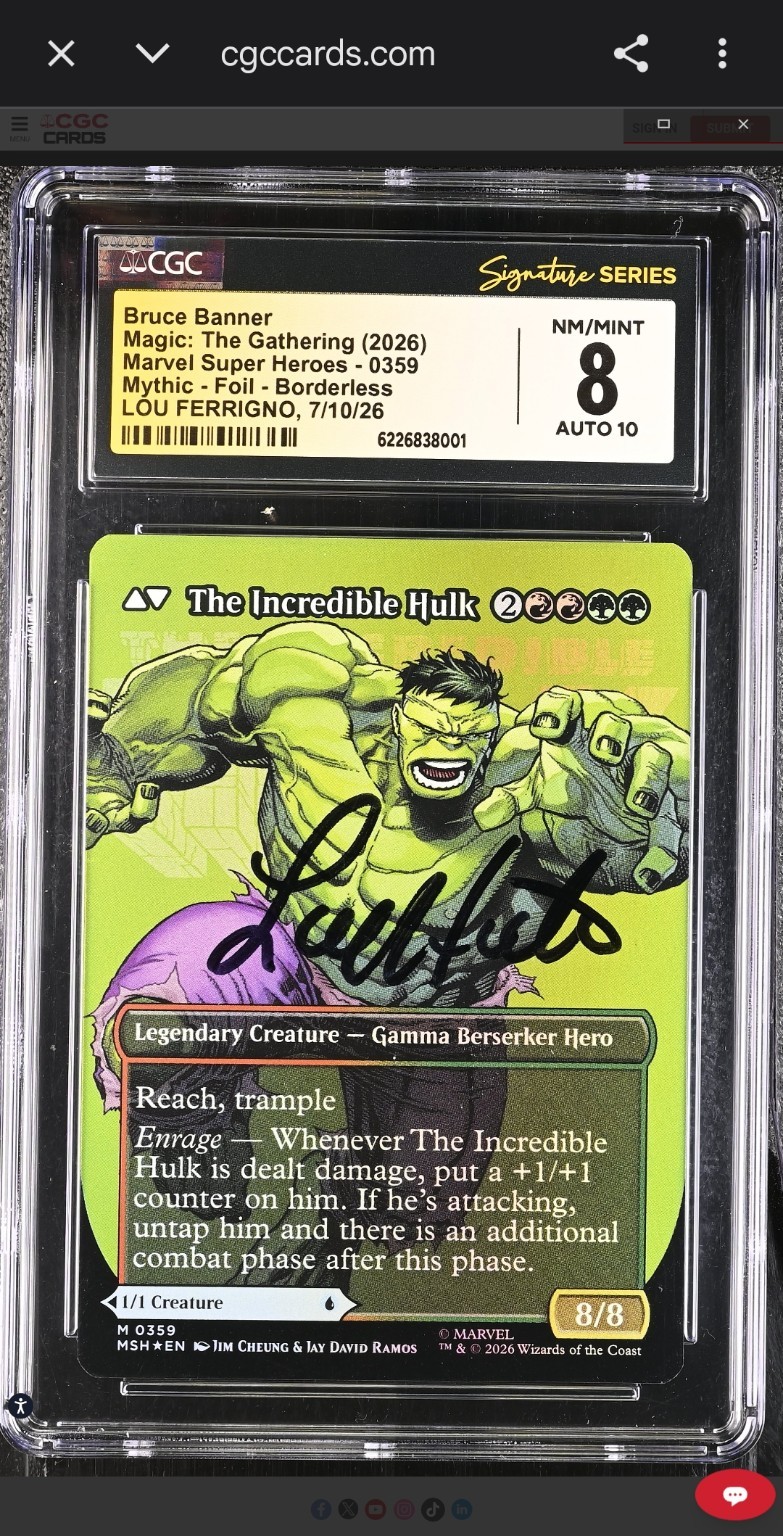
Lou Ferrigno’s signature. A 10-grade autograph. A foil borderless Hulk with a story worth seeing.
Explore the card & its story ➜Five colors. Ancient monsters. Engine pieces, cascades of value, and the sort of battlefield presence that makes polite decks suddenly develop trust issues.
Enter the set code and every card number from your opened pool, then press Generate Deck. Basic lands are added automatically.
Examples: 143, TRK 143, 143 144 145x2, or an exact Star Trek card name. If the name is not in this event, Command Center sends it to Printing Lookup above.
Paste collector numbers separated by spaces, commas, or lines. Quantities work as 143x2. Prefix Special Guests with SPG when needed.
This search is intentionally limited to printings eligible for the active event pool.
Every entered card belongs to the active event pool immediately and autosaves. Use + / − only to correct quantities.
Uses catalog color identity, including rules-text mana symbols. Artwork colors do not determine this. Clear the checks if no match appears.
Quick setup: Clean your lens, use soft light, place one card on a plain surface, and hold the camera steady above it.
Enter the set code and every card number from your opened pool, then press Generate Deck. Basic lands are added automatically.
Add cards you opened to an event pool for Draft or Sealed builds. This does not add cards to an EDH deck or your owned Collection.
Build a 40-card Limited recommendation using only the selected pool, with suggested basic lands. Your EDH decks stay separate.
Create and select pools here. Direct Add and pool builds use the selected event pool.
Browse owned Collection copies stored anywhere outside a deck. Choose a confirmed deck to filter by its format and add cards to its decklist; storage does not move automatically.
Upload or paste your existing card collection instead of entering cards individually. Preview exact printings, quantities, foil/nonfoil or etched finish, condition, language and storage before saving. Cards are added directly to your private collection.
Recognizes common export headers such as Name / Product Name, Quantity / Total Quantity, Set Code / Set Name, Collector Number / Number, Foil / Printing and Scryfall ID / Product ID. Files without enough printing details require you to choose the exact printing. Existing copies are preserved and quantities are added. Repeating the same file does not add duplicates.
Rows without a language use English; verify the printed language before confirming. Each row may use a different language: English (en), Japanese (ja), Russian (ru), Italian (it), Korean (ko), French (fr), or another supported catalog language. For plain lists, put [language] at the end. Exact-printing and language conflicts require review; nothing is added until you confirm.
Download the official Whatnot US listing-template CSV. Choose Auction or Buy it Now and a starting price when exporting. The chosen price applies to each listing; Shipping Profile remains blank for completion in Whatnot. Review all draft details before publishing. Exact printing and finish are included in the title and description.
Choose a commander and describe the deck you want.
Create a Main Location, then a Sub-location, then an optional Refined Location. Use search and sorting for card attributes.
Select up to 500 matching entries at a time. Quantity applies to every selected entry. Relocation moves all selected physical copies; saved decklists stay unchanged.
Prices use TCGplayer Market and retail references first, with synchronized Scryfall USD prices as a fallback.
Selections within a group match any checked option; different groups combine. Card colors and color identity are separate. Expand a group to search its options. Option counts describe the catalog, not your current search.
Read the documents below, then acknowledge each statement. Acceptance is saved to your account through the end of this calendar month (America/Chicago), including after signing in again. You can decline and continue using other Command Center features.
Read Privacy Policy · Read Seller Tools Terms
The terms describe your selling responsibilities, technical limitations, and limitations of liability where permitted by law. They do not waive rights that cannot legally be waived.
Checking your agreement status…
Mobile display notice: Live Card Display may not function properly on mobile devices because of graphics limitations and restrictions on opening display windows or sending output to a TV or second monitor. For the best experience, use a desktop or laptop.
Catalog breaks show the highest available finish per printing. Collection displays show only the finishes you own and their actual finish-specific values. No automatic minimum or maximum. Use the optional price range for either card source. Each finish keeps TCGplayer-first pricing with its existing reference/Scryfall fallback. Unpriced cards are included unless a price bound is entered.
Deselect to exclude printings found only in Collector Boosters and use regular-booster finishes where verified. Product contents come from MTGJSON. Unverified printings remain included and are counted in the status; artwork or foil alone does not prove exclusivity. This applies to Catalog breaks only; already-owned Collection cards are not booster-filtered. First-time checks may take longer; results are cached.
Load your board, then create a private read-only link for OBS. Anyone with this link can view the selected cards and seller branding, but cannot access your account or manage cards. Keep the link off your stream. Links last up to 12 hours and end on server restart. Keep Seller Hub open for live updates; after refreshing it, create a replacement link.
For immediate use without a link, capture the signed-in popout using OBS Window Capture.
Changes require your current password. Sign in again after saving. The owner's email cannot be reassigned.
This removes your profile, collection, decks, event pools, seller information and credits from active services. Your account cannot be restored through the owner controls. Private operational backups and required payment/security records may remain. Offline data on other devices must be cleared there. Export anything you want to keep first.
Choose an account once to manage its profile, access, membership and credits.
Choose an account to begin.
Complimentary benefits never change account roles or create a payment subscription. USD credits are noncash promotion-fee credits; banner days are redeemed in Seller Hub. Membership days extend the same tier. Permanent memberships remain intact.
Archiving disables sign-in and retains saved data. Permanent self-service deletion is separate.
No email is sent automatically. Share credentials privately or have the user reset their password.
IP addresses may be shared by households and networks. Your current address and Cloudflare proxy addresses are protected. Bans affect online services; already-saved offline tools cannot be remotely revoked.
Registration is open. Create a direct signup link when needed.
Owner authority is reserved exclusively for [email protected].